A completely new function in PileCalc
Previously, the PileCalc has calculated only resistances of single piles. Since version 5.0.0.0, PileCalc also calculates the loads for piles in a pile group. The program uses the finite element method and the truss model in the calculation.
The input of the foundation plate, the piles in the pile group and the loads have been made user-friendly and versatile. In addition, the calculation engine of the program is very fast, making it easy to evaluate and compare the effects of different piling and loading options.
The pile group design can be found on the menu at the left side of the program. The Pile group design function is at the bottom of the list of design sections under the selected project and calculation model.
In the pile group design, the size of the foundation plate is limited to a maximum of 100 meters x 100 meters and its thickness may not exceed 10 meters. There is no limit to the number of different pile cross-sections and the number of piles in a pile group. Piles can also be active or inactive, which allows for quick variation of different setups. The locations of piles are given in X and Y coordinates, and in addition, they can have an inclination angle and an azimuth angle.
It is also possible to enter several different loads. Loads can be forces parallel to the X, Y and Z axes, as well as moment loads acting around the axes. Similarly to piles, loads can also be either active or inactive, depending on the user's choice. This makes it easy and quick to vary different load combinations and examine their effects on the forces acting on the piles.
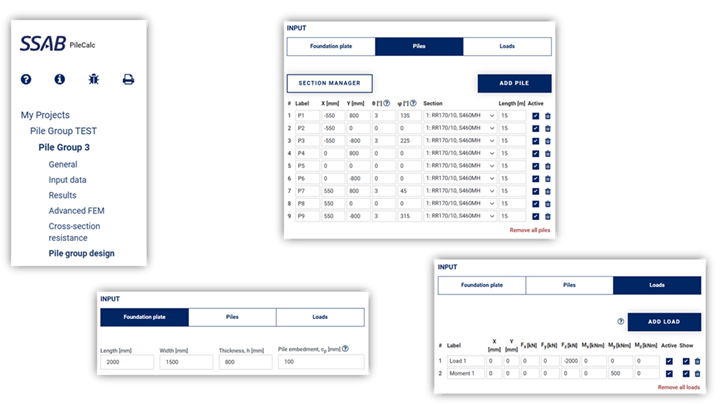
Input data for a pile group design
The results are presented both in a figure and as table values. By hovering cursor over the figure, the information of each load, pile or other drawing component is displayed. For piles, the table shows, in addition to the location and position information for the pile, the axial load applied to it and the resulting deformation. If the pile is subjected to tensile loads, it’s displayed in red both in the image and in the table, which makes noticing of such situations easy.
For the foundation, the table shows the location of the rotation center, as well as the displacements and rotations.
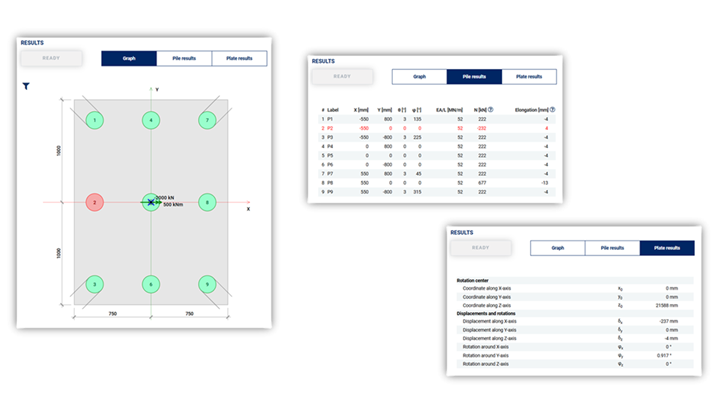
Results of a pile group design
A pdf report is also available for the pile group design, The report contains the initial data and the results as images and tables.
More information about the theory behind the calculations can be found in the program's 'Theory Manual'. Instructions and tips for using the program can be found in the 'User Manual'.
Where to find the PileCalc program
PileCalc as well as PileWallCalc program for SSAB pile products are available for free at SSAB Tubular Design Tools. From the same place you can also find FrameCalc and FrameFEM design tools for steel structures.
More information on RR® and RD® piles and RD® pile wall can be found from www.ssab.com/infra
Attachments
Category and tags